Read it as a book
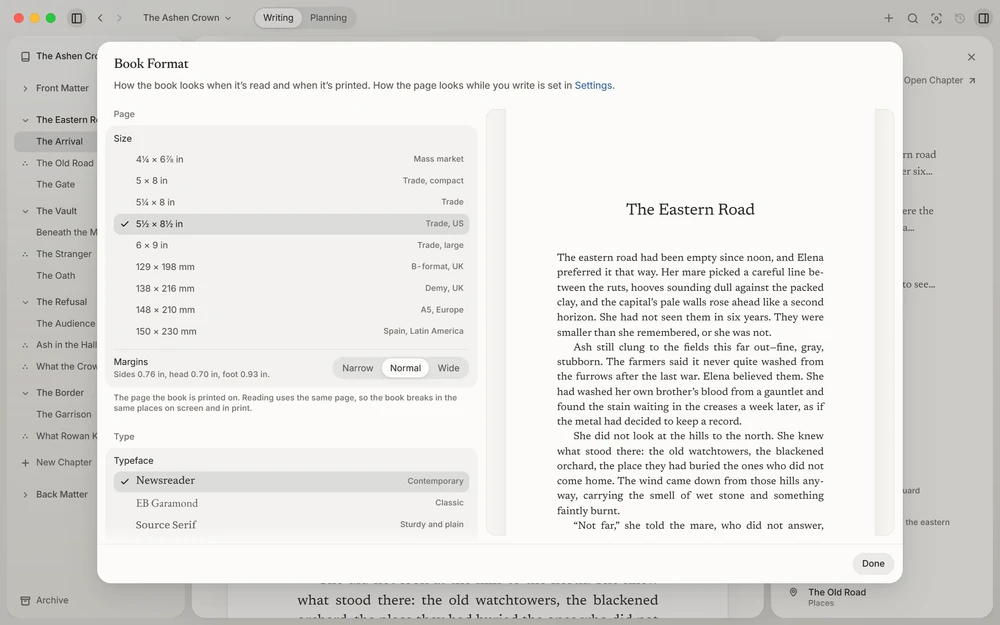
Read Book (⇧⌘RCtrl+Shift+R) shows the whole book on its pages: the page size, margins, typeface, and type size it will be printed at, so what you read is exactly what prints. A chapter can be read on its own (Read Chapter), numbered as it is in the book, and Read from Here opens the book at the scene you’re writing.
Point at a line to write it: the scene opens at that paragraph. Done, or Escape, goes back to where you were.
Book Format
Book Format (in the menu under the book’s title, or Format › Book Format) sets how the book looks, beside the book itself, so every change shows at once:
- The page: its size, from the sizes books are printed at, and its margins.
- The type: Newsreader, EB Garamond, Source Serif, or Literata, its size, and its line spacing.
- The text: justified or ragged right, hyphenation, paragraphs indented or spaced.
- Front and back matter: a layout for each kind of page.
- Chapter headings, the scene break (a line left blank, a mark such as ⁂, or an ornament of your own), illustrations, footnotes, chapter openings (a drop cap, small capitals), and running heads.
It decides only what goes around your words, never the words, and it’s the book’s look everywhere: when it’s read, when it’s printed, and in every export. How the page looks while you write is yours alone, in Settings.
Front and back matter
The sidebar’s Front Matter and Back Matter hold the pages before and after the story. A book begins with a title page and a copyright page; each side’s + offers the rest, and puts each where books do: a dedication, an epigraph, the contents, a map, a foreword, acknowledgements, About the Author, and pages of your own.
Some the book makes itself: the title page from the book’s details, the copyright page from its year and notice, and the contents from its outline, with the page each chapter begins on in print.
Pictures
A scene takes pictures as a page does: drop one on the text, paste it, or choose Insert Image…. Each can sit in the text, take a full page, fill the page to the edges, or spread across two pages, and has a caption and a description for readers who can’t see it.
A drawing (one ink on a light ground, as a map usually is) is set in the book’s ink, so it reads in the dark and prints black. A photo is shown as it is.